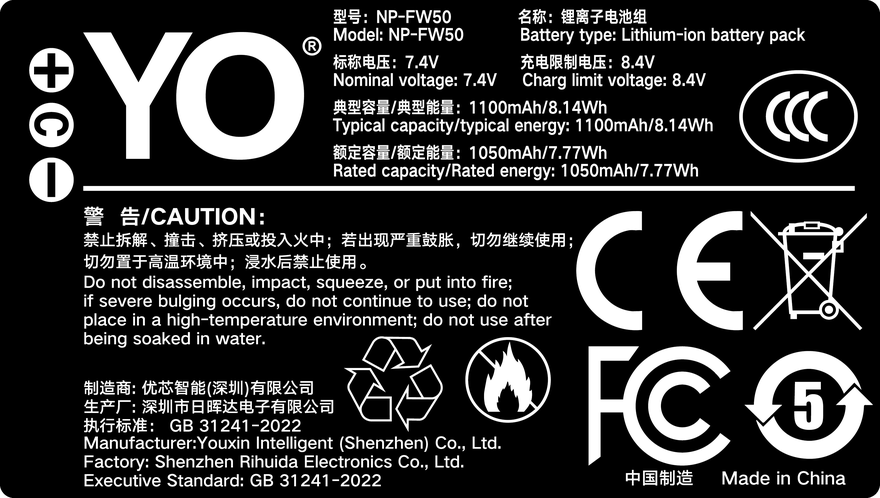
Short answer: a correctly specified third-party NP-FW50 with a decoder chip will not damage a body simply for not being genuine — the camera draws DC power within its designed range and a higher capacity rating does not “force” more into it. What does go wrong is the communication layer: the body needs to read pack data to display remaining charge, and without that exchange it may reject the cell, warn, or show a jumping readout. Poor cells and weak protection circuits are a separate risk, about build quality rather than branding. Splitting “will it harm the camera” into power delivery and data exchange makes the question answerable.
What InfoLITHIUM exchanges
Sony describes the InfoLITHIUM W series as a pack that exchanges consumption data with compatible bodies and chargers, allowing a more accurate remaining-charge indication, commonly a percentage or minutes left instead of a three-bar icon. The battery is therefore not only a power source; it carries an identity and a data channel the body reads.
A compatible cell needs a decoder chip to reproduce that behaviour. Our NP-FW50 compatible cell and the TNP-FW50 USB-C version both state a built-in decoder chip for normal communication and a true percentage readout. Without that layer, a cell can often still deliver power, but the body may have no idea how much is left.
| Layer | What the body does | What the cell must supply | Symptom when it fails |
|---|---|---|---|
| Power | Draws DC within its design range | Correct voltage, polarity, shape, protection circuit | Won’t power on, sudden shutdown |
| Communication | Reads pack data for the charge readout | Decoder chip and compatible exchange | Not recognised, warning, jumping percentage |
| Protection | Relies on the pack’s internal circuitry | Over-charge, over-discharge, over-current, short, thermal | Heat, swelling, charging faults |
Where the “harm” worry comes from
The usual fear is that a larger capacity rating will burn something out. A battery does not push energy into the body; the body draws what its own consumption requires. If the voltage sits in the designed range, capacity only decides how long that draw can continue. Our cell is quoted at 1100mAh / 7.4V / 8.14Wh, Sony’s original at 1020mAh / 7.2V / 7.3Wh — the same format family, differing in stored energy rather than in how power is delivered.
Three things do deserve attention: the quality of the cells and the protection board, since counterfeit packs may cut corners on over-current and thermal protection; usage habits such as long-term storage at full charge in heat or deep discharge, which apply to any lithium-ion cell; and camera firmware. Public references repeatedly note that a firmware update can change how a body recognises compatible packs. Nobody can promise behaviour across every body and every firmware version.
So the useful questions are not “will it harm the camera” but “is there a decoder chip, is there a protection circuit, and does the seller state the compatible models”. Those three predict real-world behaviour better than a capacity number.
Diagnosis order for recognition problems
If the body warns about the battery, shows no charge level, or the percentage jumps around, work through this order rather than repeatedly swapping packs at random:
- Confirm the body is an NP-FW50 model. Rule out the wrong format first — the α7 III and α6600 take NP-FZ100.
- Wipe the contacts on both the pack and the compartment with a clean dry cloth. Oxidation or skin oils can look exactly like a rejected battery.
- Charge the cell fully and refit it. A deeply discharged or long-stored pack often misreports on first contact.
- Cross-check with a second cell. If both misbehave, look to the body or its firmware; if only one does, look to that pack.
- Recall any recent firmware update. A new warning after an upgrade should be checked against the seller’s decoder solution, not answered with more reseating.
| Symptom | Likely cause | First action |
|---|---|---|
| “Incompatible battery” message | Decoder exchange rejected / wrong format | Verify the model code, then the firmware version |
| Powers on, no percentage | Missing or incomplete data exchange | Clean contacts, recharge fully, retry |
| Percentage jumps sharply | Under-voltage, ageing or uncalibrated readout | One full cycle, then consider replacement |
| Sudden shutdown | Poor contact, aged cell or cold | Clean contacts and warm the pack before retrying |
Choosing with fewer surprises
Prefer products that explicitly state a decoder chip, protection circuitry and a list of compatible bodies, and keep the order record in case a firmware question comes up. Do not chase the largest capacity figure: at 8.14Wh this is a small cell, and a second pack you rotate gives more certainty than a few extra rated mAh. For continuous work such as livestreaming or time-lapse, swapping cells is the wrong tool anyway — a DC supply such as the DR-FW50 external power adapter fits that job better.
One last rule: do not share chargers across different battery formats, and never keep using a cell that is swollen, smells unusual or runs abnormally hot. Retire it. That is general lithium-ion safety practice, unrelated to whether the pack is genuine.
FAQ
Will a third-party NP-FW50 damage my camera?
Not simply for being third-party. With the correct specification and protection circuitry, the body draws only what it needs and capacity decides duration. The real risks are poor cells, weak protection and buying the wrong format.
Why do some cells power the camera but show no percentage?
InfoLITHIUM’s charge readout depends on data exchange between pack and body. Without a decoder chip, or if the exchange is rejected, power may still flow but the body cannot know the remaining charge.
Is it normal to lose recognition after a firmware update?
It is a known communication-layer possibility, not a sign that the battery damaged anything. Verify the model and contacts first, then ask the seller whether the decoder solution covers that firmware version.
Is the USB-C version more likely to be rejected?
The charging port and the body communication are separate circuits. Our TNP-FW50 also carries a decoder chip, so recognition works like any other compatible cell; only the refill method differs.