Posted on — Leave a comment

LP-E6NH Long-Term Fade — When to Replace the Pack

Short answer: an LP-E6NH does not lose capacity at an even rate year by year — the first year usually drops slowly and then the pace picks up. Most users notice “it drains faster” after about two years or several hundred equivalent cycles, but that does not mean a replacement is due immediately. The signals that actually matter are full-charge runtime falling to around 60% of a new pack, or a pack that shows full and then shuts down early.

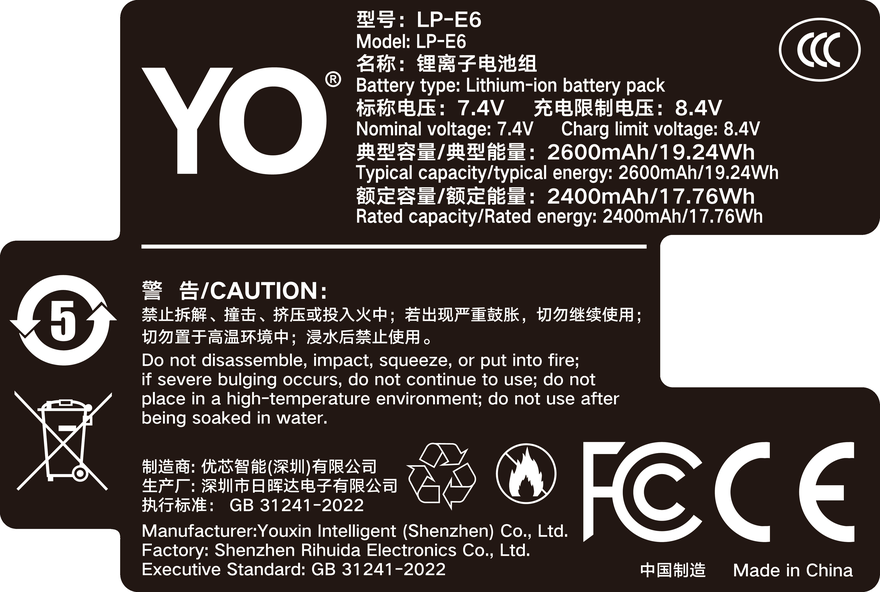
YO LP-E6NH battery rating label
Rating label of the YO LP-E6NH battery: nominal voltage, typical capacity and safety certifications.

The 2130mAh / 7.2V rating is the capacity tier Canon set for the EOS R5, R6, R6 II and R7 generation, and it is currently the capacity ceiling of the LP-E6 family — the LP-E6P’s official selling point is discharge capability, and its capacity stays in the same class. Understanding why capacity fades is far more useful than memorizing a “what’s left after one year” figure, because the rate depends heavily on how you use and store the pack.

1. Why capacity does not fall at an even rate

Capacity loss in a lithium-ion cell has two main channels. The first is the SEI layer on the anode slowly thickening with each cycle, consuming mobile lithium; this channel is essentially linear and slow. The second is lithium plating and electrolyte side reactions, which accelerate themselves once triggered and show up as a stretch where runtime drops suddenly. What decides which channel dominates in daily use is temperature and state of charge.

The LP-E6NH is two cells in series at 7.2V, which adds a third factor: consistency between the two. When the cells age at different rates, the usable capacity of the pack is set by the weaker one, and charging reaches the constant-voltage stage early. This kind of fade is hard to notice in a single session, but it makes the pack “look charged and deliver less.”

2. Four variables decide how fast your pack fades

Variable Effect on fade Relatively safe practice
Depth of discharge Running to shutdown often means more deep cycles and more side reactions Swap at 10-20%, avoid repeated full depletion
Temperature Heat is the biggest accelerator; heat during charging does more harm than during discharge Do not charge in a sun-baked car; let the pack cool after long high-bitrate recording
Storage charge Long storage at full or at zero both speed up aging Keep 40-60% for extended storage
Discharge rate Sustained high current raises internal resistance; bursts, 8K and long recording qualify Let packs cool between heavy sessions, do not charge while shooting

Translated into scenarios: an R6 II that shoots weddings all year with bursts and 4K every time will fade faster than an R7 used mostly for stills two or three times a week. That is a difference in workload, not in pack quality. On cold-weather behavior, the general patterns in battery behavior in low temperatures are a useful reference — it covers a different battery system, but the mechanism of voltage sag and rising internal resistance is the same.

3. Working out how much life your LP-E6NH has left

You can get a rough but usable answer without any test equipment. What matters is not the absolute number but how far it has fallen from a new pack. Four steps:

  1. Establish a baseline. When a pack is new, run one fixed scenario: same body, same lens, same recording settings, same ambient temperature, from full to automatic shutdown, and record the duration or frame count.
  2. Repeat in the same scenario. Every three to six months, run it again with identical settings. A difference beyond about 20% means fade has entered the noticeable range.
  3. Watch charge time. With the same charger and the same starting level, a clearly shorter charge time usually means less capacity is actually going in. This is the easiest corroborating signal.
  4. Watch for anomalies. Showing full and then shutting down mid-recording, a jumping percentage, or the body failing to recognize the pack all deserve attention ahead of capacity loss.

The step most worth keeping up is the first. Without a baseline, every later comparison rests on impression, and impressions of runtime are unreliable: one cold morning or one long high-bitrate take is enough to convince you a pack is failing.

4. When to replace, and how to split primary and spare

The first signal is full-charge runtime settling around 60% of a new pack, confirmed in two or three consecutive retests. The second is an unannounced shutdown mid-shoot, or a gauge that drops from two bars straight to power-off. The third is a safety matter rather than a fade matter — visible swelling, a case seam that has opened, or a pack that binds when inserted means stop using it immediately.

Conversely, if it merely “feels less durable” while retests differ by 10-20%, it is usually not time to replace. Adjusting your battery setup is more effective than buying a new pack at that point.

As for the setup, a practical rule is to layer packs into primary and spare. Two or three newer packs carry long recordings and heavy bursts; older packs drop down to short top-ups, timelapse and backup duty. That way a pack at 70% never fails you on a critical shoot, and your replacement budget goes only into the number of packs you genuinely need.

If your bodies span different generations, the configuration logic differs — compare the compatibility notes in the LP-E6NH category; if your body is from the R5 Mark II generation and needs higher sustained discharge, move to the material in the LP-E6P category. YO’s LP-E6NH-compatible pack usually plays the spare role in this layering, filling out the total count more economically than buying all Canon. Bear in mind that LP-E6+ is not a Canon designation — it is how some third parties (YO included) label an enhanced version, so plan by measured capacity, not by the name.

FAQ

Will an LP-E6NH lose much capacity sitting unused for a year?

Stored at 40-60% in a cool, dry place, capacity loss over a year is usually small — commonly from single digits up to slightly over 10%. Stored full in a drawer and exposed to summer heat, the loss is clearly larger. The difference lies in storage conditions, not in the pack.

How accurate is the percentage the camera shows?

The body estimates from voltage and a coulomb counter, which makes it a usable reference rather than a laboratory measurement. It is most accurate in the middle range and less so near full and near empty. So when judging fade, “how long it lasts in the same scenario” is more reliable than the shape of the percentage curve.

At what point should a pack be retired?

Around 60% of original capacity is a reasonable point to demote a pack to backup. But if swelling, abnormal heat, or a charger indicator that blinks an error for a long time appears, retire it without waiting for a capacity figure. Safety signals always outrank capacity signals.

Do new packs need “activation,” or a 12-hour first charge three times?

No. Lithium-ion packs are formed at the factory and have no memory effect; the idea of activation is a leftover from nickel-cadmium cells. Normal charging and discharging is enough, and deliberately deep cycling only adds unnecessary wear.


Posted on — Leave a comment

TNP-W126S Guide: USB-C Charging and Fujifilm Fit

Short answer: the TNP-W126S is a Fujifilm NP-W126S replacement battery with a USB-C port built into the battery itself, so a phone adapter or power bank charges it directly with no dock charger. Its dimensions match the genuine NP-W126 and NP-W126S, so it drops straight into bodies such as the X-T3, X100V and X-S10. What it changes is not the capacity figure but the charging routine: one USB-C cable and one power bank becomes enough to keep both the camera and the spare going.

YO TNP-W126S battery rating label
Rating label of the YO TNP-W126S battery: nominal voltage, typical capacity and safety certifications.

This is a change at the level of accessory logic, not an upgrade in specifications. What follows goes in order of use: how direct charging works, which cameras accept it, and where the real difference from the older NP-W126 lies.

1. What USB-C charging changes

The traditional setup is three pieces: battery, dock charger, adapter cable. The dock is not large but its shape is fixed, it takes a compartment in your bag, and in a hotel room it is easy to leave behind in the socket. Direct charging collapses that to two: the battery is the receiving end, and a cable goes to any 5V source.

The everyday sequence usually looks like this:

  1. Plug a USB-C cable into the port on the side of the battery and connect the other end to a phone adapter or power bank.
  2. The indicator on the battery starts blinking or holds steady, showing that charging has begun; the exact indicator behavior (blinking, steady, off) follows the product documentation.
  3. The light going out indicates a full charge. The time depends on the adapter’s output, so an ordinary 5V/2A phone adapter and a high-wattage fast charger will differ.
  4. Unplug and fit the battery into the body.

The value shows up most on trips and street days: sit down in a café, put the spare on a power bank, and by the time the coffee is finished you can leave with a half-filled battery. The limitation is that only one cable runs at a time, so the camera and the battery queue; carrying two cables makes life easier.

2. Compatible bodies: confirm which battery generation yours takes

Fujifilm’s battery generations are fairly clearly divided, and buying the wrong one is the most common waste. The NP-W126 series covers an earlier group of bodies; newer models have moved to the NP-W235.

Body Fits? Notes
X-T2 / X-T3 Yes This series ships with the NP-W126S and accepts a direct replacement
X-Pro2 / X-Pro3 Yes Same NP-W126S specification
X100V Yes Compact body with a normal-depth compartment; fits without obstruction
X-S10 / X-E4 Yes The two models most often given a second battery among NP-W126S users
X-T5 / X-H2 / X-H2S No These use the NP-W235 and need a different model

For bodies outside the table, if the original battery is marked NP-W126 or NP-W126S, most will accept this one as well. When unsure, check the model marking inside the battery compartment or the body manual and go by the official specification rather than by whether it “looks about the same.”

If your camera belongs to the NP-W235 camp, go straight to the NP-W235 models — that is a different set of dimensions and a different voltage.

3. NP-W126 and NP-W126S: same shape, different priorities

This is the part most often distorted by marketing language. The genuine NP-W126S is rated 1260mAh / 8.7Wh / 7.2V. It has exactly the same dimensions as the older NP-W126 and the two are interchangeable; a body will not refuse to work because an older generation is fitted.

The S version’s main change is that heat dissipation and discharge behavior were tuned for video and burst shooting. In other words, it stays steadier and runs cooler under sustained high current rather than adding a large step in capacity. So claims of “the S version has a much bigger capacity” can be set aside.

In practical terms: if you mostly shoot stills, the runtime gap between an older NP-W126 and an S version is not especially obvious; if you often shoot 4K or long bursts, the S version handles heat and voltage sag more comfortably. The YO TNP-W126S follows the S-version compatibility path, with capacity in the same range as the genuine item, and its selling point is the charging method rather than a numbers game on the spec sheet.

4. Who should buy, and who can wait

Buy it if you shoot street with an X100V, travel light with an X-S10 or X-E4, need more than one battery for a day’s shooting, and already carry a power bank. For that user, leaving one dock charger at home is a real reduction in weight and clutter.

Wait if your body is still under warranty and the idea of a third-party battery bothers you, or if you make a living from long recordings and need stable output at extreme temperatures. In the latter case, a genuine battery is usually the better match.

If all you want is one more battery alongside the ones you own, at the budget end of the market, a replacement like this is a reasonable option and clearly cheaper than a single genuine battery. For the fuller picture, browse the NP-W126S category page, where the comparable products are listed.

FAQ

Will it trigger a “third-party battery” warning?

Some bodies show a prompt the first time a third-party battery is fitted; restart the camera or ignore it and shooting is unaffected. Different firmware versions trigger differently, so it is not accurate to promise no prompt at all — but nothing gets locked out either.

Can the camera’s USB port charge this battery?

No. The body’s USB power runs the body; the battery has to charge through its own USB-C port. That is exactly why the separate port exists: putting the charging circuit in the battery is what allows it to charge away from the camera.

Is one battery enough for a day?

It depends on stills versus video. For stills only, without the built-in flash and with limited review, one typically covers 300-400 frames; 4K video draws considerably more. For a day of street shooting, plan on at least two.

Can it go on a plane?

Yes, but it must travel in the cabin and not in checked baggage. At 8.7Wh it is far below the 100Wh carry-on limit usually applied, so several are within normal practice. Check your carrier’s rules for specifics.

Further reading: if you also shoot Sony bodies, the conclusions about cold-weather voltage sag in the FZ100 cold test hold for lithium batteries generally.

Posted on — Leave a comment

NB-13L II Long-Term Wear: Why Small Cells Age Faster

Short answer: small-capacity packs like the NB-13L II appear to degrade faster, and the main reason is not poor cells but three structural factors — a higher discharge rate relative to capacity, less surface area to shed heat, and faster accumulation of cycles. To judge whether a pack needs replacing, the shrink in video recording time is a far better measure than shot counts. The three causes are explained below, followed by practical checks and care habits.

YO NB-13L camera battery render
Product render of the YO NB-13L compatible battery: front label, rear LED charge indicator and USB-C port.

First, a number for context: the OEM NB-13L is 1250mAh / 4.5Wh / 3.6V. In a camera like the G7X, with a one-inch sensor, 4K, and electronic stabilization, that capacity is just about adequate. A small pack under a large load is the starting point for everything that follows.

Three reasons small packs fade faster

Higher discharge rate

The C-rate expresses discharge current relative to capacity. For the same power draw, half the capacity means double the rate. The G7X recording 4K draws a fair amount in total, and spread across 1250mAh that rate is clearly higher than in packs of the 2000mAh class. A high rate means more polarization, more resistive loss, and more heat, and all of that accelerates side reactions.

Less cooling area

A small pack has a small surface, so the same heat spread over less radiating area produces a faster temperature rise. In the G7X series the battery sits in the grip, where your hand insulates it further. After ten-odd minutes of continuous recording the grip is noticeably warm, which is direct evidence of the pack working at sustained high temperature.

Cycles accumulate quickly

This one is most often overlooked. A 4.5Wh pack shooting vlogs for half a day may need two charges, which easily pushes past two hundred cycles in a year. At the same shooting intensity, a camera on a larger pack might see only seventy or eighty. Cycles arrive sooner, so the pack enters its degradation range sooner.

Judging whether to replace

What you observe What it roughly means What to do
Continuous recording time two tenths below a new pack Normal aging Keep using it; watch heat
Three to four tenths below Clear capacity loss Demote to backup, put a new pack in the primary slot
Cuts out mid-recording without a low-battery warning High internal resistance, voltage collapses under load Stop using it for recording; may serve as a backup
Noticeably hotter than usual while charging Raised internal resistance or a protection-board fault Retire it
Swollen case that gives when pressed Gas generation inside Stop using immediately; recycle properly

Why video runtime rather than shot count? Because shot counts depend far too much on pacing — the same pack behaves completely differently when you compose slowly versus shooting bursts. A fixed recording test (1080p 30p, fixed bitrate, room temperature, Wi-Fi off) is far more comparable. Without lab conditions that is still fine: compare the same segment of the same trip and you can see the trend.

How far down counts as the end

The general rule for lithium-ion packs is that after 300-500 cycles capacity falls to about 80% of its initial value. For a small pack like the NB-13L, if you vlog daily and charge twice a day, you may reach that range in eighteen months to two years; if you only use it on trips, four or five years may pass without getting there.

Calendar aging matters too. Even with few cycles, a pack left in a drawer for two or three years still loses capacity. So “I barely used this one” does not mean it is still new.

Habits that slow the decline

  • Do not keep it hot. Leave a few minutes between continuous takes to cool down, and do not put a just-used hot pack straight onto the charger.
  • Avoid charging while recording. The G7X series supports USB power, but the combined temperature rise of charging and recording is the least friendly thing you can do to a pack.
  • Do not drain to auto-shutdown every time. Deep discharge stresses the anode; swapping at one bar remaining is gentler.
  • Do not store it full long-term. Charging to full after a trip and leaving it in a bag for months is the most common way people damage packs.
  • Keep a spare in rotation. Alternating two packs halves the cycles on each, and the degradation curve flattens naturally.

The YO NB-13L II was improved specifically in cell consistency and cycle life, and the practical meaning is that when several packs are rotated, they behave more alike and none lags obviously behind. As for capacity, it is close to OEM rather than doubled, so do not buy it expecting “more capacity means it lasts longer”. More detail is in the NB-13L II category, and OEM models and compatible bodies are in the NB-13L category.

FAQ

Is it normal for an NB-13L II to degrade within a year?

It depends on intensity. With frequent video work and two charges a day, reaching the 80% range in a year is possible; with occasional travel use, losing less than a tenth in a year is also normal. Judge against your own new-pack baseline rather than against someone else.

Why does the camera shut down abruptly with one bar left?

Once internal resistance rises, voltage drops sharply under high current and trips low-voltage protection. Capacity has not vanished; the pack simply cannot carry the load. At that point it is no longer suitable for recording but can still serve as a light-load backup.

Can a larger battery be substituted for a small one?

No. The NB-13L is a 3.6V rectangular pack, and its dimensions and contact positions are designed for these bodies. Other models will not fit, and you should not force power through an adapter.

Can a swollen pack still be used?

No. Swelling means gas has formed inside and the structure has deformed, and continued charging or discharging carries a fire risk. Do not puncture it, do not press it flat. Isolate it, insulate it, and take it to a battery recycling point.

Posted on — Leave a comment

LP-E6NH Charger Guide — LC-E6, LC-E6E and Third-Party Docks

Short answer: the LP-E6NH has no USB-C charging port, so it must be charged in a dock. Canon’s own docks are the LC-E6 and LC-E6E, which belong to one electrical design — the suffix mainly reflects sales region and plug type. Third-party docks work and cost less, but the label must state LP-E6NH support, or you may end up with a partial charge or an oddly long charge time. Put simply, Canon sells certainty and third parties sell value. The gap is not whether the pack charges, but how accurately and consistently it stops.

YO LP-E6NH battery rating label
Rating label of the YO LP-E6NH battery: nominal voltage, typical capacity and safety certifications.

Here is how the three options actually differ.

Why the LP-E6NH can only be dock-charged

No pack in this generation of Canon’s LP-E6 line has a USB-C port on the battery itself. That means two things:

  • Charging on the road requires a dock, or charging the pack inside the camera through the body’s USB-C port.
  • A power bank cannot connect to the battery directly. It can only run through the body, and the wattage plus whether shooting while charging works depends on the model.

This is not unique to the LP-E6NH — the LP-E6P has no charging port either. The whole family charges the same way; the differences sit in the charger itself.

LC-E6 and LC-E6E: two versions of one generation

These two are often read as successive products, but they are closer to regional variants of the same dock. In use they behave identically: a single bay, an indicator light for charge status, and an automatic stop when full.

Item LC-E6 LC-E6E Third-party dock
Supported packs LP-E6 / E6N / E6NH series LP-E6 / E6N / E6NH series Check the label; it must state LP-E6NH
Bays Single Single Single or dual; dual is more common
Full-charge detection Follows Canon’s cell curve Follows Canon’s cell curve Wide variation; budget models cut off early
Heat control Consistent Consistent Uneven; dual bays run hotter with two packs
Price bracket Canon pricing Canon pricing Clearly lower; common in the budget bracket

If your body is a recent model, one of these two probably came in the box. Both carry a charge curve that accounts for the LP-E6NH’s 2130mAh capacity and will fill it properly.

Three things to check on a third-party dock

1. The support list on the label

A listing that says “fits LP-E6” does not mean it supports the LP-E6NH. Older docks set their cutoff for 1800–1865mAh cells, and on a 2130mAh pack that can produce two results: an early full signal (you actually get 70–80%) or a charge that drags on unusually long. The label is a better guide than the title.

2. Charge current and dual-bay behavior

A two-bay dock is convenient, but plenty of budget models split the current when both bays are loaded, nearly doubling the time per pack and concentrating the heat. If you routinely go through three or four packs a day, a dual dock is still worth buying — just accept that charging two at once is slower.

3. Heat control and how the case feels

Warmth during charging is normal; a case that is truly too hot to hold is not. Budget docks cut costs on thermal control and case dissipation first. Favor models that describe temperature protection, and avoid charging in direct sun or inside a closed bag.

What to buy, in order, if you run multiple packs

Match the order to how hard you actually shoot:

  1. Start with one Canon dock. Use it as the reference for whether a third-party pack is really full — drop a pack that a third-party dock called complete into the Canon dock, and if it keeps charging for a long time, that dock’s cutoff is early.
  2. Then add a dual-bay third-party dock for bulk top-ups. Use it for daily rotation and charge everything the night before a shoot; efficiency is the whole point.
  3. Avoid no-name adapters that plug a battery straight into a power bank. They lack heat control and balancing, and they are hard on cells over time.
  4. Match pack numbers to charging bays. A fixed pairing makes it far easier to trace a problem to one pack or one bay.

For capacity and fit, see the LP-E6NH category; if you are still on an early body, the LP-E6 baseline models category covers the earlier specs. Third-party brands such as YO usually sell packs and docks as a bundle at a price well below a Canon kit, which makes them a reasonable second charging setup. One naming note: LP-E6+ is not a Canon designation — it is how some third parties (YO included) label an enhanced version of the LP-E6 form factor.

Charging habits matter more than the charger

Even the best dock cannot rescue bad habits. A few practical ones:

  • Do not charge immediately after a shoot. Let the pack come back to near room temperature first, especially after a summer day outdoors.
  • Do not store packs at a full 100% long term. For extended storage, keep them around half.
  • Do not leave a pack flat for months. Over-discharge can leave it unable to wake up.
  • Take packs off the charger once full. Canon’s dock has cutoff protection, but leaving them connected buys nothing.

FAQ

Can the LC-E6 and LC-E6E be used interchangeably?

Yes. Both charge the LP-E6 series to the same specification; the differences are sales region and plug type. When buying across regions, check the plug standard and the voltage marking, and use a plug adapter where needed.

Will a third-party dock damage a Canon pack?

A compliant one will not; a non-compliant one can. The risks come from a wrong cutoff voltage and missing heat control. When pairing a Canon pack with a third-party dock, watch for a pack that is unusually hot after charging or that loses runtime sharply, and stop using that dock if you see either.

Why does the camera show less than 100% after a full charge?

This is common with third-party docks. The dock judges fullness by voltage, while the body combines a coulomb counter with the voltage curve, so the two use different criteria. A 5–10% gap is normal; a much larger gap means the dock is cutting off early.

Can I charge the LP-E6NH through the camera’s USB-C port?

You can charge a pack while it sits in the body, but power is limited, it is slow, and the body warms up. That is fine in an emergency, but a dock is the better daily option. Check your body’s manual for what it actually supports.

Posted on — Leave a comment

Charging a New NP-FZ100: Is the 12-Hour First Charge a Myth?

Short answer: the 12-hour first charge is a myth, and following it can do more harm than good. The advice comes from nickel-cadmium and nickel-metal hydride days, when cells had a memory effect and needed a long trickle charge to wake up. The NP-FZ100 is lithium-ion. It has no memory effect and ships with usable charge. A matching charger switches its indicator and stops output when the pack is full, so leaving it connected adds nothing but hours at 100%.

YO NP-FZ100 camera battery render
Product render of the YO NP-FZ100 compatible battery: front label, rear LED charge indicator and USB-C port.

Five steps for the first use

Step 1: inspect it out of the package

  • Step 1: check the shell for dents, bulges or deep scratches, and the contacts for discoloration or deformation.
  • Step 2: confirm the markings on the pack match what you ordered — NP-FZ100 is 2600mAh / 7.2V / about 19.24Wh.
  • Step 3: confirm the model suits your body. NP-FZ100 covers the A7 III, A7R III/IV/V, A7 IV, A7S III, A9 series, A1, A6600, A6700, A7C series, FX3, FX30 and ZV-E1. The A6400, A6500 and A7 II series use NP-FW50 — check the Sony mirrorless battery cross-reference.

Step 2: shoot first or charge first, either is fine

  • Step 1: new packs usually arrive with partial charge, so you can mount and shoot. A full charge first is not required.
  • Step 2: if the body says remaining charge may not display accurately, that is common and you can keep shooting. It comes from how the body estimates remaining charge.
  • Step 3: for a “cannot recognize” or “cannot use” message, power down, clean the contacts, reseat, and contact support if it persists. Process in warranty and returns.

Step 3: charge normally with a matching charger

  • Step 1: confirm the charger lists NP-FZ100 compatibility and that pins and sockets are snug.
  • Step 2: start the charge. Slight warmth during charging is normal.
  • Step 3: once the indicator turns green, unplug. There is no need for extra hours on top.
  • Step 4: if it becomes hot or smells, cut power and stop using the pack.

Step 4: run a few full cycles to calibrate

  • Step 1: for the first two or three uses, run from full down to the low-battery warning, then charge fully.
  • Step 2: this is not about waking up the cell. It gives the body a reference discharge curve.
  • Step 3: after calibration, go back to topping up as you go. Do not deliberately drain it every time.

Step 5: confirm the runtime you get

  • Step 1: under your usual settings, note the frame count or recording time from full to the low-battery warning.
  • Step 2: official CIPA figures usually sit between 500 and 700 frames, with real-world results commonly 60–80% of that, lower for video.
  • Step 3: if the gap looks large, rule out temperature and settings, then check whether the capacity matches the label.

Why the 12-hour rule stuck around

It was not invented from nothing. It is a habit left over from an earlier technology:

  • Nickel cells did need it: early rechargeables had a memory effect, and long trickle charging helped realize capacity.
  • Early chargers were crude: cutoff logic was imprecise, so extra time was treated as insurance.
  • Lithium is different: packs and chargers now include overcharge protection, and long periods at full charge tend to accelerate capacity loss.

Three reminders for first use

  • Do not drain it on purpose: deep discharge does lithium cells no favors. Top up when the camera warns you.
  • Do not leave it charging unattended overnight: unplugging when full is steadier, and lets you notice abnormal heat sooner.
  • Store at half charge if it will sit: around 40–60%, in a cool dry spot at 15–25°C, topped up every three months. Details in long-term storage guidance.

If the pack sat around before first use

Treat it as stored stock first. Check for bulging, shell deformation and contact oxidation. If charge is clearly low, bring it to roughly half before shooting rather than deep-cycling it immediately. The full storage and retrieval routine is in long-term storage guidance, and telling wear from failure is covered in NP-FZ100 lifespan and capacity loss. If it has swollen, stop using it and route it to recycling — do not puncture or burn it. Dispose of it through a proper recycling point.

FAQ

How long does a new pack take to charge?

Go by the indicator. It is usually on the order of an hour or two depending on starting charge and current, and no extra top-up time is needed.

Is a part-charged new battery a defect?

No. Packs ship with partial charge so you can use them straight away. Just charge it up.

Must the first charge run until the camera shuts off?

No. A full cycle is for calibrating the body, worth doing a couple of times. Day to day, top up as you go.

Can I shoot while charging?

Some bodies accept power through their USB port, with charging speed and heat varying by model. For long recording, a dummy battery with an adapter is steadier — match voltage and connector.

Only need a spare? The NP-FZ100 2600mAh comes on its own, with a charger, or as a two-battery kit. Both versions hold 2600mAh; the USB-C one costs slightly more and saves you carrying a dock.

Posted on — Leave a comment

EN-EL15 Buying Guide: 2600mAh / 19.24Wh vs the Original EN-EL15c

Compare watt-hours before milliamp-hours: our EN-EL15 compatible cell is 2600mAh / 19.24Wh, while the original EN-EL15c is 2280mAh / 16.4Wh. Milliamp-hours describe charge, not energy, so they cannot be compared across voltage platforms. Watt-hours (voltage x capacity) are the honest figure. Where a label states both a typical and a minimum rating, use the minimum for conservative runtime estimates.

By CIPA standard the Z6 III delivers about 380 shots per charge (D850 1500+). Real-world figures fall with viewfinder use, bursts, flash and low temperature, so budgeting around 70% of the rating is safer.

Original vs our cell, item by item

The table puts the original rating and our compatible cell on the same basis. Price is the listed retail figure; check the product page for current terms. Where a minimum rating is printed, that figure is the better basis for conservative estimates.

Item Original Our compatible cell
EN-EL15 2280 mAh 2600 mAh
Wh 16.4 Wh 19.24 Wh
mAh (min) — 2400 mAh
CNY — ¥85.5

Balancing capacity, price and warranty

Higher capacity does not double your shots: the body cutoff voltage and its fuel-gauge algorithm both shape the reading. For a spare cell, price, cycle life and warranty often matter more than the peak number.

Item Value
EN-EL15 EN-EL15 / 15a / 15b / 15c
EN-EL15c 2280 mAh / 16.4 Wh
en-el15 2600 mAh / 19.24 Wh
Z6 III 380 / D850 1500+
Z9 → EN-EL18d EN-EL15 / 15a / 15b / 15c
EN-EL15 / 15a / 15b / 15c 2600 mAh / 19.24 Wh

Choosing a kit by shooting load

For light use, one original plus one spare is enough. For a full day of travel or video work, carry two or more and rotate them through a dual-bay charger.

To pick by model, start with the specifications and stock status on Nikon EN-EL15 2600mAh, then browse the full article set in EN-EL15; if your body belongs to a neighbouring system, EN-EL25 has the side-by-side explanation.

FAQ

Is 2600mAh an inflated rating?

Our EN-EL15 compatible cell is specified at 2600mAh / 19.24Wh. The label also states a minimum of 2400mAh. while the original EN-EL15c is 2280mAh / 16.4Wh. Compare the Wh figures rather than mAh alone.

Should I look at mAh or Wh?

Wh. Milliamp-hours only become energy once multiplied by voltage, so comparing mAh across different voltage platforms is misleading. 19.24Wh is the like-for-like baseline for this pack.

Can a higher-capacity cell damage the camera?

No. As long as the shell, contacts and protection circuit match the system, capacity only affects runtime. The one caveat is that older bodies may report charge level inaccurately.

Should I buy one cell or two?

For a full day outside or video work, carry two or more and rotate them through a dual dock. For indoor or short sessions, one original plus one spare is enough. Budget conservatively against the Z6 III baseline.

Posted on — Leave a comment

Replacing the Battery in an Aging A7R III: Genuine or Third-Party NP-FZ100?

The Sony A7R III also runs on the NP-FZ100, shared with the A7 III, A7 IV and the A9 line. This body has been around for years, so most original cells have seen three to four hundred cycles and commonly sit at roughly 80 percent of their rated capacity.

YO NP-FZ100 camera battery render
Product render of the YO NP-FZ100 compatible battery: front label, rear LED charge indicator and USB-C port.

That leaves a practical choice. A genuine Sony pack through official channels generally runs $70 and up. Our compatible cell is about $17.89. If the A7R III is still your main body, buy two or three cells to rotate and keep the original as a backup. If it has become a second body or a casual camera, replacing everything with compatible cells at once makes more sense. Mixing both types is fine — there is no requirement to keep the fleet on one brand.

The A7R III Situation: Spec Unchanged, Cells Aging

The A7R III is a high-resolution body. Sensor readout and processing carry real load, per-frame handling takes longer than on lower-resolution cameras, and burst and live-view draw runs higher. That makes it sensitive to battery health. A cell down to 80 percent might still cope in a newer camera, but on the A7R III you get the classic symptom: two bars showing, a dozen frames of burst, then a low-battery warning.

The other reality of an older body is that its accessory pipeline thins out. Genuine packs remain available, but prices stay high and the range of options narrows over time. Compatible cells are a legitimate alternative here, and often the more practical one for a body still in service: you get 2600mAh at around 19.24Wh (18.72Wh for the USB-C version), for a fraction of the cost.

Where Genuine and Compatible Actually Differ

Factor Genuine Sony NP-FZ100 Compatible (ours)
Rated capacity In line with the spec 2600mAh (NP-FZ100) / 2600mAh (NP-FZ100 (USB-C))
Voltage and energy 7.2V 7.4V, around 19.24Wh or around 18.72Wh
Reference price Generally $70 and up officially About $17.89 per cell, about $36.74 for two with charger
Camera readout Full remaining-charge display Works on most bodies; some note the readout may be approximate
Cycle life Normal lithium range Normal lithium range, roughly 80 percent after 300–500 cycles
Availability Narrowing for older bodies Continuous supply, stable spec

Worth stressing: the aging curve is the same chemistry either way. Roughly 80 percent capacity remains after 300 to 500 cycles, a visible drop after a year is normal, and replacement around the two-year mark is common. No cell of any brand holds factory performance for five years.

When Staying Genuine Makes Sense

  • You deliver paid commercial work and cannot have any compatibility message appear on set, so certainty is worth the premium.
  • Body and batteries are company assets, and purchasing requires one brand and consistent invoicing.
  • You use one or two cells at low intensity, so a higher unit price barely moves your total.

In these cases you are buying process and peace of mind. That is a reasonable choice and does not need defending.

When Compatible Makes More Sense

  • You need several cells. A7R III users often want three or four, and genuine pricing scales painfully.
  • The body is late in its service life. Putting expensive accessories into a discontinued camera loses appeal over time.
  • You want redundancy. Reserve cells sit unused and cycle rarely, so cheaper packs make sense.
  • You are equipping a team. Studios and rental houses kit out per person, where unit cost matters more.

If you mix, label the two types, and before anything important run both through one rotation to confirm they behave the same in your body. The full comparison lives at NP-FZ100 genuine vs third-party.

While You Are Changing Cells, Check These Too

Contacts and springs

On a five- or six-year-old body, the compartment contacts collect oxidation and dust, raising resistance and shortening perceived runtime. A dry soft cloth or a light pass with an eraser often fixes the “plenty of charge, sudden shutdown” complaint.

Door and latch

Make sure the door still latches tightly. A loose door can cut power momentarily on a gimbal or even handheld, and that failure is easy to misread as a bad battery.

Firmware

Battery management logic shifts with firmware updates. If this body has not been updated in a while, check the current version and decide from there — it affects both runtime and how accurate the gauge reads.

Disposing of old cells

Do not bin them. Swollen cells stop immediately and go to a proper recycling point. Cells that are merely tired should also go to a drop-off rather than sitting around stored at full charge.

FAQ

Will third-party cells damage an A7R III?

A compatible pack that matches the spec — 7.2V, same dimensions and contacts — is a standard replacement and adds no extra risk in normal use. Avoid unbranded sources, deformed casings or anything already swollen.

Is third-party runtime much worse?

With similar rated capacity, the gap usually lands somewhere between a few percent and the mid-teens, varying with body and habits. Results far below expectation usually trace back to cycle wear or cold rather than brand.

Can genuine and compatible be mixed?

Yes. Same spec means the body does not care. Group them by condition so you are not rotating cells with very different wear levels through one important job.

My old cell is swollen — can I keep using it?

No. Stop immediately, do not charge or discharge further, and take it to a battery recycling point. Never puncture or burn it.

Bottom Line

Only need a spare? The NP-FZ100 2600mAh comes on its own, with a charger, or as a two-battery kit. Both versions hold 2600mAh; the USB-C one costs slightly more and saves you carrying a dock.

Posted on — Leave a comment

“LP-E6: Swelling, Fast Drain and Unreadable Packs”

Short answer: a swollen LP-E6 must come out of service immediately. It cannot be repaired and it must never be punctured to vent gas. Fast drain is usually a rise in internal resistance from aged cells, cold conditions or long storage at full charge. When the body refuses to recognise a pack, check contact oxidation and the decoder circuit first. Each of the three has a completely different remedy, so identify which one you have before deciding to repair or replace.

YO LP-E6P camera battery render
Product render of the YO LP-E6P compatible battery: front label, rear LED charge indicator and USB-C port.

All three share one trait: none of them happens suddenly. Swelling is usually preceded by long periods stored full or used in high heat; fast drain is often preceded by charge levels that jump; a pack the body will not read has often been dropped, exposed to water, or left with blackened contacts. Watching for those early signs is far more useful than reacting afterwards.

Swelling: the only correct response is to stop

The physical cause of swelling is gas generation inside the cell. Overcharging, over-discharging, high heat and simple ageing all break down the electrolyte and release gas, which pushes the foil pouch out and bows the casing. The process is irreversible, and no household method reverses it.

How to check. Lay the pack flat on a table or a sheet of glass and press gently on the corners. If it visibly rocks or lifts, it has swollen. If it feels tighter than usual going into the body, or the door needs force to latch, suspect swelling too. A slight bulge is invisible to the eye but changes how the pack seats.

Three things never to do. Do not pierce it to release gas — lithium reacts violently with air. Do not put it in a freezer — condensation inside raises the short-circuit risk. Do not put it back in the camera to “use it a few more times”. None of these is excessive caution; each is a common origin of real incidents.

What to do instead. Stop using it, cover both terminals with insulating tape, keep it alone in a metal container away from anything flammable, and get it to a hazardous-waste point or battery collection bin promptly. Do not put it in household rubbish and do not leave it sitting at home for months.

One related note: if a swollen pack is already jammed in the bay, do not lever it out with tools. Take it to a repair centre — damaging the bay or puncturing the cell both cost more than a new battery.

Fast drain: rule out the environment, then suspect the cell

Symptom Most likely cause How to check What to do
Full pack drops to half in a week Standby drain inside the body Remove it and repeat the week Take the pack out when not in use
Drains very fast outdoors in winter Cold raises internal resistance See whether charge partly returns once warm Keep spares against your body
First 70% is fine, last 30% shuts down Aged cell, steeper voltage curve Watch whether it repeats Replace the pack
A new pack is worse than the old one Overrated capacity or poor cells Compare charge time and heat Return it, buy one with clear ratings
Gauge jumps from 3 bars to 1 Inaccurate decoder estimate Run a full charge/discharge calibration Replace if calibration does not help

Cold deserves separate treatment. Below freezing, electrolyte viscosity rises and lithium ions move more slowly, so usable capacity shrinks — you see two bars left and a warning after a handful of frames. The pack is not broken; capacity partly returns once it warms up. For how much is lost at different temperatures, the data in this minus 10°C battery test comes from another pack, but the trend is the same.

A pack the body will not read: start at the contacts

When the body reports a communication error or an unrecognised battery, work through the following in order. Eight out of ten cases are solved by the first two steps.

  1. Clean the contacts. Take the pack out, rub the terminals and the metal tabs inside the bay with a clean pencil eraser, then wipe with a cotton swab and anhydrous alcohol, let it dry and refit. Oxide layers and fingerprint grease are the most common cause.
  2. Cross-check with another pack. Fit a known-good pack into the same body. If it behaves, the original pack is the problem; if the error persists, the fault is in the body contacts or firmware.
  3. Check the firmware. Some bodies change how they handle third-party packs after an update. If you upgraded recently and the pack used to work, read the official release notes first.
  4. Check for water damage or a drop. Corrosion on the protection board after moisture, or cracked solder joints after a fall, both break communication. Damage of that kind usually comes with a deformed casing or an odd smell.

If cleaning and cross-checking both fail, the decoder circuit inside the pack has failed. Such a pack will often still supply power, but the body cannot read its charge and treats it as unknown. That is acceptable for unimportant work, but do not take it out for anything that matters — you have no way to predict how much is left.

Making one last longer

  • Do not store packs at full charge. Around half is the most stable state; top up before you go out.
  • Do not run them to shutdown. Swap at the last bar, because deep discharge damages the cell cumulatively.
  • Avoid heat. Do not leave packs in a car in summer, and do not charge them on a duvet or a sofa.
  • Use a matching charger. The LC-E6E will charge all four LP-E6 generations; unbranded chargers with inaccurate cut-off voltages are a common cause of swelling.
  • Run a full charge and discharge every so often so the body can recalibrate its curve — every three to six months is enough.

For how the four generations differ in capacity and discharge, see the LP-E6 family section. Owners of smaller bodies face the same logic but a different pack, covered in the LP-E17 section.

FAQ

Can a slightly swollen pack still be used?

No. Swelling means gas has formed inside and the casing has lost mechanical strength; continuing to charge and discharge risks rupture and fire. “Slight” only means it is not yet visible — a tighter fit in the bay is already the signal. Retiring it is the only recommendation.

Does fast drain mean the pack is failing?

Not necessarily. Rule out three external factors first: was it left in the body on standby, was it used in the cold, had the firmware just been updated. If none applies, run a full charge and discharge to recalibrate. Only if it still drains fast should you conclude the cells are aged.

Can a third-party pack damage the body?

A properly built compatible pack will not harm the camera in normal use. The risk comes from two kinds of product: cheap cells with no protection board, which can overcurrent, and casings with poor dimensional tolerance that are hard to insert and wear the contacts in the bay. Choosing a brand with clearly stated specifications keeps the risk manageable.

What is the safest way to store an old pack?

Charge to about half, store it separately, keep it away from metal objects and top it up every three to six months. Once a pack has swollen or leaked, treat it as hazardous waste rather than keeping it at home. Store it away from radiators, balconies and anywhere children can reach.

Posted on — Leave a comment

EN-EL15 Compatibility Chart: 21 Bodies and the Models That Do Not Fit

The EN-EL15 covers 21 bodies, from the D500 to the Zf; the most common buying mistake is not capacity but boundary cases such as Z9 → EN-EL18d. The table below lists every compatible body by series, followed by the models that take a different cell. Always trust the marking on the camera or in the battery compartment: similar-looking packs are not necessarily interchangeable, and EN-EL15 / 15a / 15b / 15c should still be checked against the contacts and firmware of your body.

By CIPA standard the Z6 III delivers about 380 shots per charge (D850 1500+). Real-world figures fall with viewfinder use, bursts, flash and low temperature, so budgeting around 70% of the rating is safer.

Full compatibility list

All 21 bodies below accept the EN-EL15 or a cell from the same family, grouped by series. “Compatible” means the compartment and contacts match; it does not guarantee that older bodies can exploit the full capacity of a high-capacity pack.

Body Body Body Body
D500 D600 D610 D750
D780 D800 D800E D810
D850 D7000 D7100 D7200
D7500 Z5 Z6 Z6 II
Z6 III Z7 Z7 II Z8
Zf

Which models do not fit

This is where search results most often mislead. Packs with similar names and near-identical shells frequently belong to entirely different systems, and forcing one in can damage the compartment.

Item Value
EN-EL15 EN-EL15 / 15a / 15b / 15c
EN-EL15c 2280 mAh / 16.4 Wh
en-el15 2600 mAh / 19.24 Wh
Z6 III 380 / D850 1500+
Z9 → EN-EL18d EN-EL15 / 15a / 15b / 15c
EN-EL15 / 15a / 15b / 15c 2600 mAh / 19.24 Wh

How to check before ordering

The reliable check is the model printed on the bottom of the body or inside the battery compartment, matched against this list. On a used camera, also confirm that a previous owner has not swapped the battery door.

To pick by model, start with the specifications and stock status on Nikon EN-EL15 2600mAh, then browse the full article set in EN-EL15; if your body belongs to a neighbouring system, EN-EL25 has the side-by-side explanation.

FAQ

How many bodies take the EN-EL15?

Our list contains 21 bodies, from the D500 to the Zf. It is grouped by series, but still check the body marking, since a later generation in the same line can switch cells.

Is the EN-EL15 interchangeable with neighbouring models?

EN-EL15 / 15a / 15b / 15c shares one shell and contact layout, so those cells fit each other. However, Z9 → EN-EL18d, and those bodies need their own cell — never judge by shape alone.

Will every body on the list benefit from higher capacity?

All of them run normally, but older bodies set their cutoff and fuel gauge to the original specification, so extra shots do not scale linearly and the percentage may read conservatively.

How do I confirm which cell to buy?

Read the model on the bottom plate or inside the battery compartment and match it against this list. If the marking includes a suffix or a “for use with” note, follow the manual rather than the capacity figure.

Posted on — Leave a comment

LP-E6NH on the R7 — Burst Shooting vs 4K 60p Drain

Short answer: the R7 ships with the LP-E6NH, so whether it works is not the question — whether one pack is enough is. The answer: for burst shooting alone the battery is nowhere near the bottleneck, and one pack lasts a long time; the real drain is long continuous 4K 60p recording. For a mixed shooting day two packs usually suffice, and for a full day of intensive video three or more is the safer starting point.

YO LP-E6NH battery rating label
Rating label of the YO LP-E6NH battery: nominal voltage, typical capacity and safety certifications.

The common instinct is that 30 frames per second must be brutally demanding. The opposite is closer to the truth. Burst shooting is a pulsed load — each burst is short, and the gaps are spent on buffer and card writes — so average draw stays low. Video is a continuous load: the sensor keeps reading out, the processor keeps encoding, the body keeps managing heat, and average draw is an order of magnitude higher. Get that difference straight and the arithmetic works out.

1. The two loads are structurally different

During a burst the main draws are the focus motor driving back and forth, the mechanical or electronic shutter firing, and the buffer being written to the card. All three are intermittent: once a sequence ends, the camera moves into write and cache mode and draw immediately falls away. So burst shooting is high peak, low average — often the pack is still comfortable when the card fills.

4K 60p is another matter. Sixty frames means the sensor reads out sixty times a second, doubling the data of 30p; the processor downsamples, encodes and writes continuously; and the body maintains its thermal strategy while the screen or finder stays lit the whole time. These loads stack and never pause, and once the body warms up, draw climbs further. That is why the same pack feels completely different after 2,000 stills and after an hour of 4K 60p.

There is a third item that is easy to overlook: idle time. The R7’s finder and rear screen keep working between shots, and in a four-hour shoot you may press the shutter for only twenty minutes while the rest is standby. Idle draw looks small but accumulates into more than the bursts themselves.

2. The runtime arithmetic, by scenario

Shooting type Main draws Relative consumption Suggested setup
Still bursts (sport, birds) Focus drive, shutter, card writes Low to moderate One pack covers most of a day
Intermittent 4K 30p Sensor readout, encoding, screen Moderate to high Two packs is comfortable
Continuous 4K 60p High-frame-rate readout, encoding, cooling High Two minimum, three for long sessions
Timelapse Idle plus intermittent shutter Depends on duration External power recommended
Mixed shooting day All of the above Moderate Two packs plus a charger in rotation

No minute figures are given here, because one pack varies widely with bitrate, ambient temperature and cooling. High-bitrate 4K 60p commonly lands around the one-hour mark with some spread; cold conditions cut it noticeably and a warm, ventilated setting helps. For a precise answer, run a baseline test on your own body.

3. Working out how many packs a shoot needs

  1. Sort by type first. Split the day into burst time and video time and estimate each separately. Do not estimate from total hours.
  2. Run one baseline. Take a nearly full LP-E6NH, record 4K 60p with settings as close to real use as possible until the camera shuts down, and note the duration. That single number beats any spec table.
  3. Apply an idle discount. Real shoots rarely record continuously; much of the day is standby and playback. Estimating usable recording time at 70-80% of the baseline is closer to reality.
  4. Add redundancy. Add one pack on top of the worst-case estimate. You can leave a pack unused, but you cannot run short — especially on a shoot that cannot be repeated.

4. Four settings that genuinely save power

First, shorten the auto-off time for the finder and rear screen, back to 15 or 30 seconds; on a mixed shooting day this is the single biggest gain. Second, turn off wireless connections and auto transfer you are not using — Wi-Fi left on in standby is a commonly underestimated drain. Third, drop screen brightness to a workable level: high brightness is necessary at noon outdoors and unnecessary indoors. Fourth, review images less often; playback lights the whole screen and reads and decodes the card, which is pure overhead.

One caution: the body’s power-saving mode usually caps burst speed or video specifications, so do not sacrifice performance for power when shooting action. Carry one more pack instead.

On battery and charging rhythm, the right habit is not “run one pack flat, then swap” but “charge the moment a pack comes out.” A Canon dock charger, LC-E6 or LC-E6E, fills an LP-E6NH in roughly two to three hours, so any gap longer than two hours keeps rotation viable; for a day of back-to-back shooting, two packs is the floor and three is comfortable. For charger choice, see the charger material in the LP-E6NH category; if your body is a model such as the R5 Mark II that needs higher sustained discharge, look instead at the LP-E6P category.

Also, in cold conditions the usable capacity of any pack drops, and carrying three is more realistic than two; the mechanism is covered in battery behavior in low temperatures. YO’s LP-E6NH-compatible pack works well as the “third pack” in a backup plan, absorbing the extra load without adding cycles to your primary packs. Note that LP-E6+ is not a Canon designation — it is how some third parties (YO included) label an enhanced version, so read the specification rather than the name. For how each LP-E6 generation maps to the R7, go back to the LP-E6NH category for the compatibility list.

FAQ

What happens if I put an LP-E6N or LP-E6 in the R7?

It fits and it shoots — the shell and contacts are identical. But capacity is lower, so runtime shrinks, and some charge and status information may be less complete than with the supplied pack. Fine for light everyday use, not advisable as the primary pack for demanding work. Check the body manual for specifics.

Does 30 fps burst shooting wear out the battery?

Far less than continuous high-bitrate video. Bursts are short pulses, so pack temperature rises little; the sustained heat of long 4K 60p sessions is the bigger concern. What usually limits bursts is not the pack but buffer depth and card write speed.

With two packs in a vertical grip, are they used in parallel or in turn?

Most bodies draw from one pack first and switch when it is depleted rather than sharing the load evenly. Runtime ends up close to the sum of the two, but the pack does not gain extra momentary current from being “in parallel.” Check the body and grip documentation.

Is it better to run a pack to shutdown before charging?

No. Lithium-ion packs have no memory effect, and deep discharge adds wear. Bodies like the R7 warn you early at low charge; swapping at the warning is the simplest approach.